~/blog $ cat 05-going-live.md
Part 5: Scheduled orders and custom formulas

Up to now you have driven everything by hand. In this chapter we let the system run on its own schedule.
By the end:
- A cooldown order that re-ingests the HN feed every two minutes.
- A cron order that prunes old items and compacts the database nightly.
- A custom formula (
mol-rss-digest) that an LLM-backed agent runs on a cron, picks the day’s top items, and commits a realdigest.mdto the rig. - A
/digestroute that renders the digest in the browser.
The new concept here is orders: scheduled triggers that fire either after a cooldown elapses or on a cron expression. Orders can run an exec (a shell command) or a formula (a polecat’s lifecycle).
Order shapes
Two trigger types: cooldown (fire every N seconds/minutes) and cron (fire on a cron expression). Two execution shapes: exec (shell command) and formula (polecat through a formula’s steps). Part 5 walks through three of the four combinations: cooldown+exec, cron+exec, cron+formula.
Beat 1: a cooldown order that re-ingests the feed
rss-fetch is the first job. We want fresh items every couple of minutes; cooldown is the right trigger because we just want “every 2 min, period.”
Create city/orders/rss-fetch.toml:
[order]
description = "Fetch HN RSS feed every two minutes and ingest new items"
trigger = "cooldown"
interval = "2m"
exec = "cd /Users/<you>/.../gas-city-tutorial/rss-reader && bun run src/cli/ingest.ts"
timeout = "30s"
Replace the <you> path with your real path. Yes, the absolute path is ugly; covered below.
gc order listYou should see rss-fetch listed. After two minutes:
gc order history
sqlite3 ../rss-reader/rss-reader.db "SELECT COUNT(*) FROM items;"
The history has one or more rows; the count grew. To force-fire without waiting:
gc order run rss-fetchManual gc order run does not write history but does run the exec. Useful for “is the exec line valid” verification.
Sidenote: why the absolute path, and the order-scope rule
rss-fetch is at city/orders/rss-fetch.toml, which makes it a city-scoped order. The exec runs in whatever working directory the order dispatcher happens to be in; relative paths are brittle. Absolute is the cleanest answer.
There is a subtle thing buried in the order primitive worth knowing: the location of the order TOML file determines which bead store gets the work bead. Files under city/orders/ create city-scoped beads (prefixed rt-). Files under <rig>/orders/ create rig-scoped beads (rr-).
The pool field on a formula-shape order names the target agent, but it does not determine the bead store. So if you put a rig-scoped formula order at city/orders/, the dispatcher creates beads in the city’s store and your rig-bound polecat (which reads from the rig’s store) never sees them. The order fires forever, beads pile up, no work happens.
We will run into this in Beat 3 when we write the digest order. The fix is to move the file to the rig.
Beat 2: a cron order that prunes and compacts
rss-fetch keeps adding rows; without counter-pressure the table grows forever. Delete items older than 30 days and reclaim the space. This is a “run at 4am” job, so cron is the right trigger.
Write city/orders/rss-vacuum.toml:
[order]
description = "Prune items older than 30 days and compact the rss-reader sqlite database nightly"
trigger = "cron"
schedule = "0 4 * * *"
exec = "sqlite3 /Users/<you>/.../gas-city-tutorial/rss-reader/rss-reader.db \"DELETE FROM items WHERE published_at < datetime('now', '-30 days'); VACUUM;\""
timeout = "5m"
Both statements run in one sqlite3 call: delete rows older than 30 days, then VACUUM to reclaim the freed space. SQLite’s VACUUM rewrites the file in-place; on its own it does nothing in a write-only database, which is why we pair it with the DELETE.
For the first 30 days of your app’s life the DELETE is a no-op (nothing matches), but VACUUM still runs and the order has a healthy history.
Verifying cron without waiting until 4am
Two ways to confirm yours is wired right:
- Force-fire once.
gc order run rss-vacuumruns the exec immediately. No history row written, but you confirm the SQL parses. - Temporarily switch to every minute. Edit the schedule to
* * * * *, save, wait 60 seconds, then revert. fsnotify picks the edit up without a restart.
gc order run rss-vacuumSidenote: reading gc order check for cron
Two messages that read confusingly the first time:
cron: schedule not matched. The current minute does not match the expression. Fully expected outside the matching window.cron: already run this minute. The order fired during the current minute and the dispatcher is waiting for the next minute boundary. Per-minute deduplication guard; safe to ignore.
Neither is a failure. A cron order that says “schedule not matched” all afternoon is doing exactly what it should.
Beat 3: a custom formula and a cron order that runs it
So far the orders run shell commands. The third one is different: it dispatches a formula to a polecat, and that polecat is an LLM session that picks today’s top items, writes a markdown digest, and commits it.
Why this shape: anything that needs judgment (which items are interesting, what to write about them) cannot be a shell command. Anything that needs to commit on behalf of a specialist already has a polecat lane (backend) we can use. So the order’s job is to spawn a backend polecat with a structured assignment, and the formula is what the polecat follows.
This is also the chapter’s reader-writes-one-config-from-scratch moment.
Step 3a: extend city.toml to give the rig its own formula layer
The order will live in the rig (because the formula will live in the rig, and the work needs to land in the rig’s bead store). For Gas City to scan a rig’s orders/ directory, the rig has to declare a formula layer. Open city/city.toml and add formulas_dir:
[workspace]
provider = "claude"

[[rigs]]
name = "rss-reader"
formulas_dir = "../rss-reader/formulas"
Then create the directories:
mkdir -p ../rss-reader/formulas ../rss-reader/ordersThe dispatcher only scans rig orders if the rig has at least one rig-exclusive formula layer registered. Without formulas_dir, the rig’s formula layers are identical to the city’s, and the rig’s orders/ directory is never scanned. Even an empty formulas/ directory is enough to flip the switch.
Step 3b: write the formula
Create rss-reader/formulas/mol-rss-digest.toml:
description = """
  Generate a daily RSS digest. Select the most interesting items from the
  last 24 hours and write a one-paragraph summary per item to digest.md
  in the rig.
  """
formula = "mol-rss-digest"
version = 1

[vars]
[vars.issue]
description = "The work bead ID for this digest run"
required = true

[[steps]]
id = "generate-digest"
title = "Pick top items, write digest, commit"
description = """
  Generate the daily digest from the last 24 hours of RSS items.

  1. Read your assignment:
  ```bash
  bd show {{issue}}
  ```

  2. Query the last 24 hours of items:
  ```bash
  sqlite3 rss-reader.db <<'SQL'
  .headers on
  .mode list
  SELECT id, title, source_domain, url, published_at
  FROM items
  WHERE published_at >= datetime('now', '-1 day')
  ORDER BY published_at DESC;
  SQL
  ```

  3. Pick the 5 most interesting items. Use your judgment. Look at
  title, source domain, recency. Favour technical depth, surprising
  findings, and items that read as substantive rather than churn.

  4. Write digest.md in the rig root:
  ```
  # Daily digest, <YYYY-MM-DD>

  1. **<title>** ([<domain>](<url>)) - <one-sentence rationale>
  2. ...
  ```

  5. Commit:
  ```bash
  git add digest.md
  git commit -m "digest: $(date +%Y-%m-%d) top items"
  ```

  6. Close the bead:
  ```bash
  bd update {{issue}} --status=closed --notes "Wrote digest with 5 items"
  ```

  Exit criteria: digest.md exists in the rig, committed, bead closed.
  """

[[steps]]
id = "drain"
title = "Signal completion"
needs = ["generate-digest"]
description = """
  Work is done. Signal the controller:

  gc runtime drain-ack
  """
Two notes on the syntax:
formula = "mol-rss-digest"is the formula’s name (how orders refer to it), independent of the filename.{{issue}}in a step description resolves to the step’s bead id when the polecat picks it up.
The two steps form a tiny DAG: do the work, then drain. Without the explicit drain step the polecat’s molecule does not close cleanly; think of it as a “work complete, recycle me” handshake.
A mild gotcha: in step 6 above, bd update {{issue}} --status=closed resolves to the step’s bead, not the parent molecule, so the molecule sometimes lingers as open even after the work is finished. Cosmetic for our purposes (the file is committed, the digest exists). If it bothers you, change the step to look up the parent (bd show {{issue}} --json | jq -r .parent_id) and close that instead.
Step 3c: write the order that dispatches the formula
Create rss-reader/orders/rss-digest.toml:
[order]
description = "Generate the daily RSS digest at 8am"
formula = "mol-rss-digest"
trigger = "cron"
schedule = "0 8 * * *"
pool = "backend"
Three differences from the cron order in Beat 2:
formula = "mol-rss-digest"instead ofexec = "...". The order dispatches the formula.pool = "backend"names the target polecat lane. The work bead created by the dispatcher getsgc.routed_to = "rss-reader/backend"stamped on it; the reconciler spawns a backend polecat.- The file lives at
rss-reader/orders/, notcity/orders/. The order-scope rule from Beat 1 in action.
Step 3d: reload and force-fire
gc supervisor reload
gc order list
gc order run rss-digest
gc supervisor reload forces a rebuild of the in-memory layer cache; safe move whenever you add a formula or move an order between scopes (fsnotify alone does not always rebuild for new files).
You will see a backend polecat spawn in gc session list, run the formula’s steps, and after a couple of minutes the rig has a new commit:
cd ../rss-reader
git --no-pager log --oneline -3
cat digest.md
The digest is real: five HN items from the last 24 hours with one-line rationales, committed by the polecat with a message like digest: 2026-05-02 top items.
Beat 4: render the digest in the browser
The digest exists on disk. The natural closer for Part 5 is to surface it in the app.
gc handoff --target mayor "Add /digest route" 'When digest.md exists at the rig root, expose a GET /digest route that renders the file as HTML. The digest is markdown; render it with a small markdown-to-HTML conversion (any minimal lib is fine). If digest.md is missing, show a friendly empty state pointing at the cron schedule. Match the existing index page styling; add a small "Daily digest" link in the header so it is discoverable from /. Decompose, pre-route the chain, and let it run hands-off.'(No gc session kill needed; the mayor’s prompt has not changed since Part 4.)
The mayor decomposes into two beads (frontend template + index header link, backend route), pre-routes both, lets the chain run. A few minutes later the rig has two new commits:
cd ../rss-reader
bun run src/index.ts &
sleep 1
curl -sI http://localhost:3000/digest | head -1
kill %1
You should see HTTP/1.1 200 OK. Open http://localhost:3000/digest in a browser. The digest renders. The header on / has a “Daily digest” link.
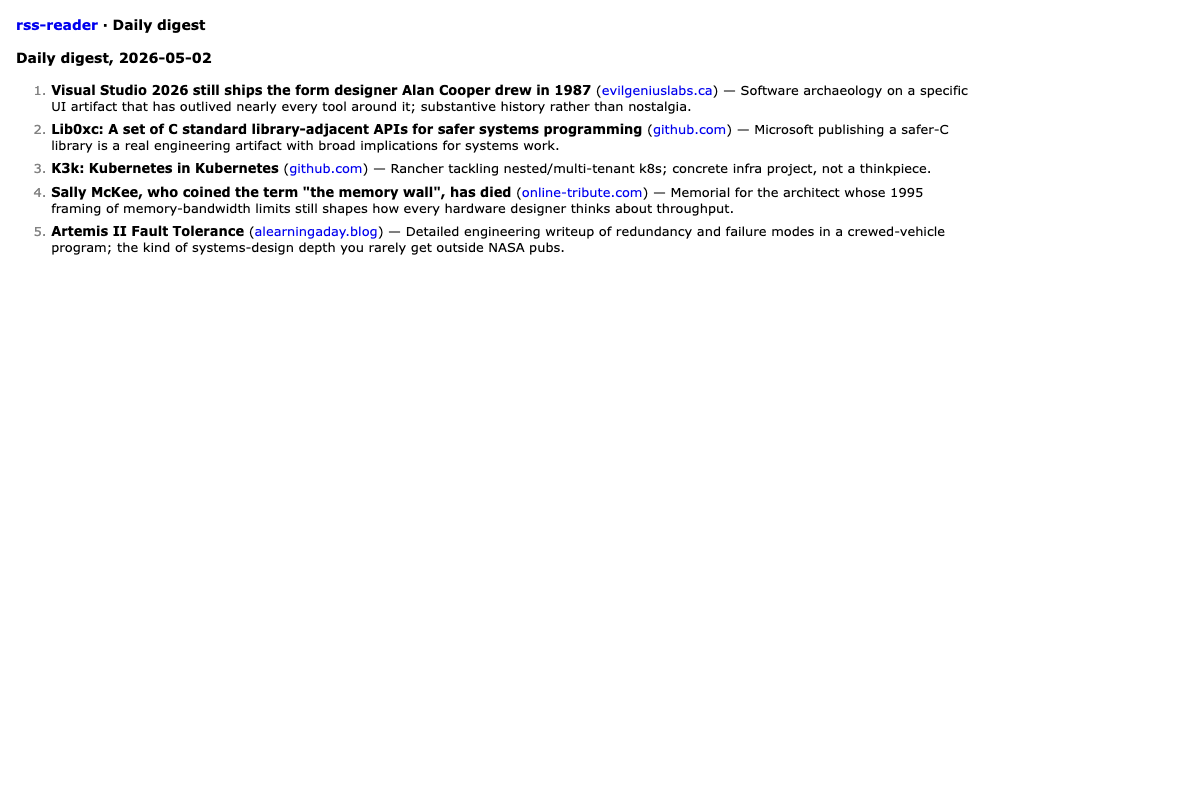
The loop is closed: cron fires, agent generates, app renders. Cooldown ingest still drips in fresh items every two minutes, the nightly prune is on its schedule, the daily digest at 8am will produce tomorrow’s content while you sleep.
How would this look in a deployed app?
Everything in this chapter ran on your laptop because Gas City is running there: the supervisor is up, dolt is serving, polecats can spawn into Claude Code sessions, your API keys are in the environment. We did it locally for two reasons. First, Part 5 is the chapter that teaches orders and custom formulas, and the easiest way to teach the primitives is to use them. Second, you end up with a working app you can poke at locally.
If you ever wanted to actually deploy this RSS reader, the picture changes considerably. Gas City’s value lives during construction. For the four scheduled pieces in this chapter specifically, GC is overkill in production, and the right deployment shape is different for each.
Cooldown order: re-ingest HN every 2 minutes
A classic scheduled task, well-served by primitives older than Gas City.
- Platform cron.
*/2 * * * *in Vercel Cron, Fly machines schedule, k8s CronJob, systemd timer, or plain crontab calling yourbun run src/cli/ingest.tsscript. - In-process timer. At app boot, run
setInterval(ingest, 120_000). The app does its own ingestion loop. Simplest deployable shape: one process, one container. - Sidecar worker. A separate process whose only job is the ingest loop. Useful when you want to scale or restart it independently of the web app.
Gas City’s order primitive does not buy you anything extra. For this app, in-process setInterval is what I would reach for.
Cron order: nightly prune + VACUUM
Same shape as the cooldown one, different schedule. Same SQL. Platform cron or in-process setTimeout aligned to 4am. At our scale (hundreds of items, maybe thousands after months) raw VACUUM is fine.
The digest: where the LLM call lives
The interesting one because the work itself is an LLM call. Three production options:
Option A: run Gas City on the server. Deploy the rig, the city, the supervisor, dolt, the coding-agent CLI, and the API key onto the host. Total overkill for a daily LLM call. Right when you have other multi-agent work happening on the server.
Option B: run Gas City somewhere else with credentials. Commit the artifact. Deploy from git. GC runs where the API keys live (your laptop, a worker box). The agent produces digest.md, commits, pushes. Your prod host auto-deploys on push or pulls on cron. Right when you want the agent’s output reviewable and version-controlled.
Option C: skip Gas City in prod entirely. Call the LLM API directly. A small script: query the DB, build a prompt, call Anthropic via SDK, store the digest. Trigger it with whatever scheduler your platform offers. Right when your “agent” is really just one LLM call.
For this app, Option C is the right default, and the production version is small enough to write out:
// scripts/digest.ts
import Anthropic from "@anthropic-ai/sdk";
import { Database } from "bun:sqlite";

const db = new Database("rss-reader.db");
const items = db.prepare(`
  SELECT title, url, source_domain
  FROM items
  WHERE published_at >= datetime('now','-1 day')
  ORDER BY published_at DESC
`).all();

const client = new Anthropic();
const msg = await client.messages.create({
  model: "claude-sonnet-4-6",
  max_tokens: 2048,
  messages: [{
    role: "user",
    content: `Pick the 5 most interesting items from this list.
Use your judgment: technical depth, surprising findings, substantive
posts over churn. Return markdown with a numbered list, each item
'**title** ([domain](url)) - one-sentence rationale'.

Items:
${JSON.stringify(items)}`,
  }],
});

const today = new Date().toISOString().slice(0, 10);
db.prepare("INSERT OR REPLACE INTO digests (date, body_md) VALUES (?, ?)")
  .run(today, msg.content[0].text);
Triggered by 0 8 * * * in your platform’s cron config. The digest is now stored as a row in a digests table, not a file:
CREATE TABLE digests (
  id INTEGER PRIMARY KEY,
  date TEXT NOT NULL UNIQUE,
  body_md TEXT NOT NULL,
  created_at INTEGER DEFAULT (unixepoch())
);
DB-as-storage makes more sense than file-as-storage in production. The digest is content, not configuration. No git pushes from prod.
The custom formula you wrote earlier is not wasted: the prompt content (which items, in what shape, with what tone) ports directly into the prompt string above. The formula authoring exercise teaches the LLM-prompting muscle; the deploy decision is orthogonal.
/digest route
In production, the route reads from the table:
app.get("/digest", (c) => {
  const row = db.prepare(
    "SELECT date, body_md FROM digests ORDER BY date DESC LIMIT 1"
  ).get() as { date: string; body_md: string } | null;
  if (!row) return c.html(digestEmptyState());
  return c.html(digestPage(marked.parse(row.body_md), row.date));
});
You can also expose /digest/:date for old digests. DB-as-storage gives you that for free.
The pattern that emerges
| Tutorial primitive | Production replacement |
|---|---|
cooldown order (rss-fetch) | platform cron, or in-process setInterval |
cron order (rss-vacuum) | platform cron with the same SQL |
custom formula (mol-rss-digest) | platform cron + 30-line script + Anthropic API |
/digest route reading file | route reading from digests table |
Gas City disappears from the production picture entirely. That is a feature, not a flaw. GC earned its keep during construction: the mayor’s decompose-and-route, the multi-specialist chain, the review loop in Part 4. None of that is the daily digest.
A useful mental test: when you imagine a feature, ask whether the work is one LLM call with deterministic surrounding code, or a coordination problem across multiple capabilities with judgment at each step. The first wants a script and a scheduler. The second wants Gas City. The RSS digest is the first. Building the RSS reader was the second.
Shape check
- Three orders registered (
gc order list):rss-fetch(cooldown 2m, exec, city),rss-vacuum(cron 0 4 * * *, exec, city),rss-digest(cron 0 8 * * *, formula, rig). - One custom formula
mol-rss-digestatrss-reader/formulas/mol-rss-digest.toml. city.tomlhasformulas_dir = "../rss-reader/formulas"on the rss-reader rig block.rss-reader/digest.mdexists and is committed.GET /digestreturns the rendered digest.GET /has a “Daily digest” link.
When your order goes off-script
gc order listdoes not show your rig-scoped order. Addformulas_dirtocity/city.toml, createrss-reader/formulas/, rungc supervisor reload.- Order fires but no polecat picks it up. The bead landed in the wrong store. If you slung from
city/orders/for a rig-bound polecat, move the order TOML torss-reader/orders/. - Formula-shape order fires but
formula "<name>" not found in search paths. Move the formula file to the rig, rungc supervisor reload. fsnotify alone does not always rebuild the layer cache for new files. - Cron schedule fires at the wrong hour. The cron evaluator uses local time, not UTC. So
0 4 * * *is 4am in whatever timezone your laptop is configured for. Adjust accordingly, or run the city in a UTC-configured environment if absolute time matters.
In Part 6 we wrap up: one feature request, one mayor handoff, all four specialists running together hands-off.
Have thoughts? Find me on X to continue the discussion.